Timesheets and payroll prep
Staff → Timesheets turns clock data into pay-period numbers. Two tabs:
- Daily review: one day's time cards, for the end-of-night check while memory is fresh.
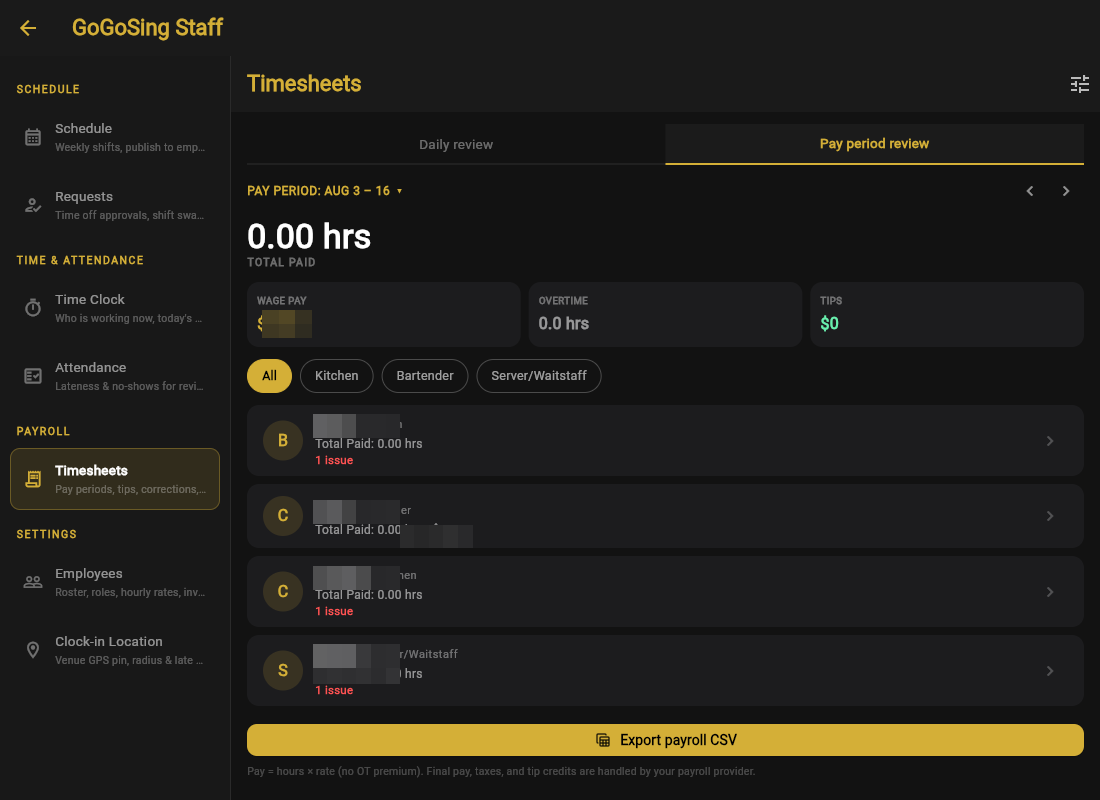
- Pay period review: the one you run payroll from, with total hours, wage pay, overtime hours, and tips for the period, then a card per employee.
Issues are flagged for you
An employee card showing 1 issue means something needs eyes, typically a missing clock-out or a shift with no matching time card. Open the card, fix the entry (see Time Clock), and the totals update.
Exporting
Export payroll CSV gives you hours, wage, overtime and tips per employee, ready to hand to your payroll provider or accountant.
GoGoSing prepares the numbers; it is not a payroll service. Pay shown is hours × rate without OT premium. Final pay, taxes, and tip credits are your payroll provider's job. Hourly, salary-per-period, and tipped roles are all carried through the export.
Run the period review the morning after a period ends, not payday morning. Issues are easy to fix while the shift is days old and impossible to reconstruct weeks later.