Building the weekly schedule
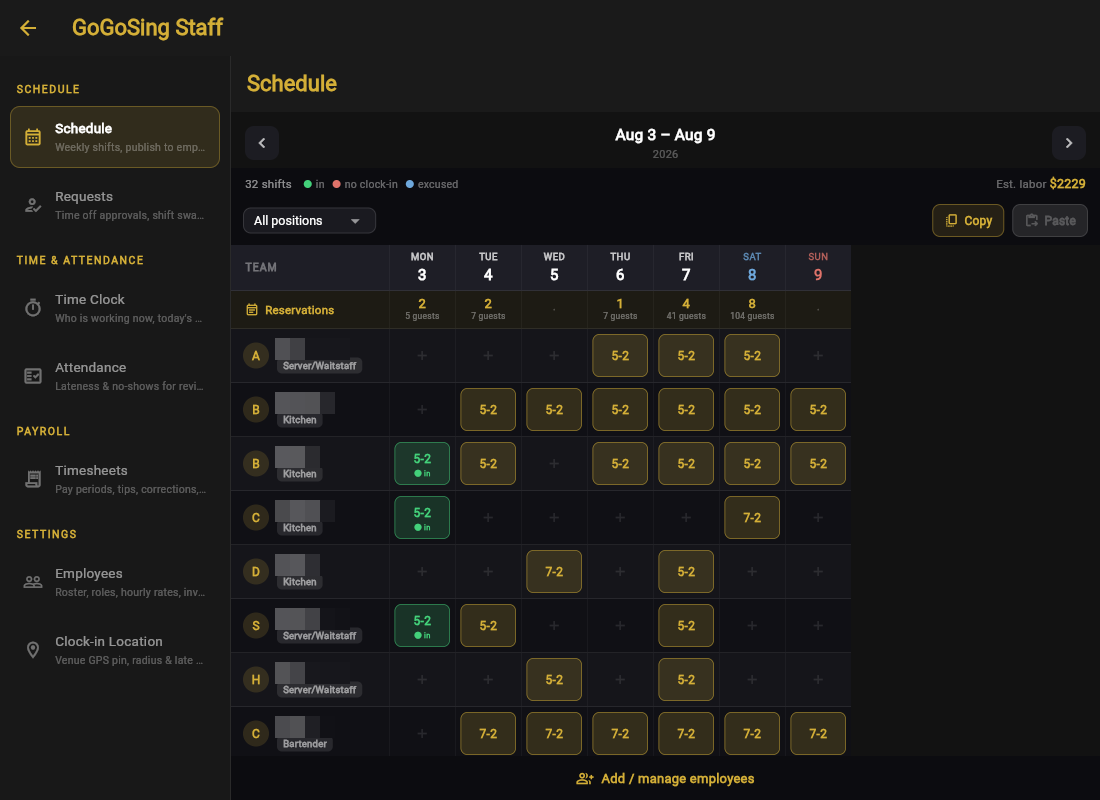
Open Staff → Schedule. Team down the side, days across the top, one cell per person per day.
The parts that matter
- Tap a cell to add or edit a shift (start–end, e.g. 5–2 for a 5 PM to 2 AM close). Tap an existing shift to change or remove it.
- Reservations row: bookings and guest counts for each day, right above the roster. Saturday shows 104 guests booked while Wednesday shows none, so you staff to demand rather than to habit.
- Est. labor: the week's wage cost from the shifts you have drawn, updating as you edit. Pair it with the reservations row and you are scheduling against revenue, not guessing.
- All positions filter: show only Kitchen or only Bartenders when balancing one station.
- Copy / Paste: copy this week into next week, then touch up. Most venues' schedule is 90% the same every week, so stop rebuilding it from zero.
Clock-in status, live on the grid
Once a day starts, each shift chip shows its truth: in (clocked in), no clock-in, or excused. Your Friday-night question, "is everyone actually here?", is answered by the grid itself.
Employees set their availability from their own phone (days off, limited hours), and it shows up here when you schedule. Fewer "I told you I can't do Tuesdays" conversations. Time-off that you approved blocks the day too.